For years, Spotify users have meticulously crafted the soundtracks to their lives, turning everyday moments into personal experiences with over 9 billion playlists created worldwide. Now, the platform is giving its most dedicated curators and music lovers a powerful new tool to elevate their art.
With Spotify’s new beta feature, Premium users can take their creativity to the next level with the ability to add and customize transitions between tracks.
This feature, called “Mix,” is now available in the Philippines, allowing listeners to control what happens between songs, transforming a simple playlist into a truly unique, flowing mix.
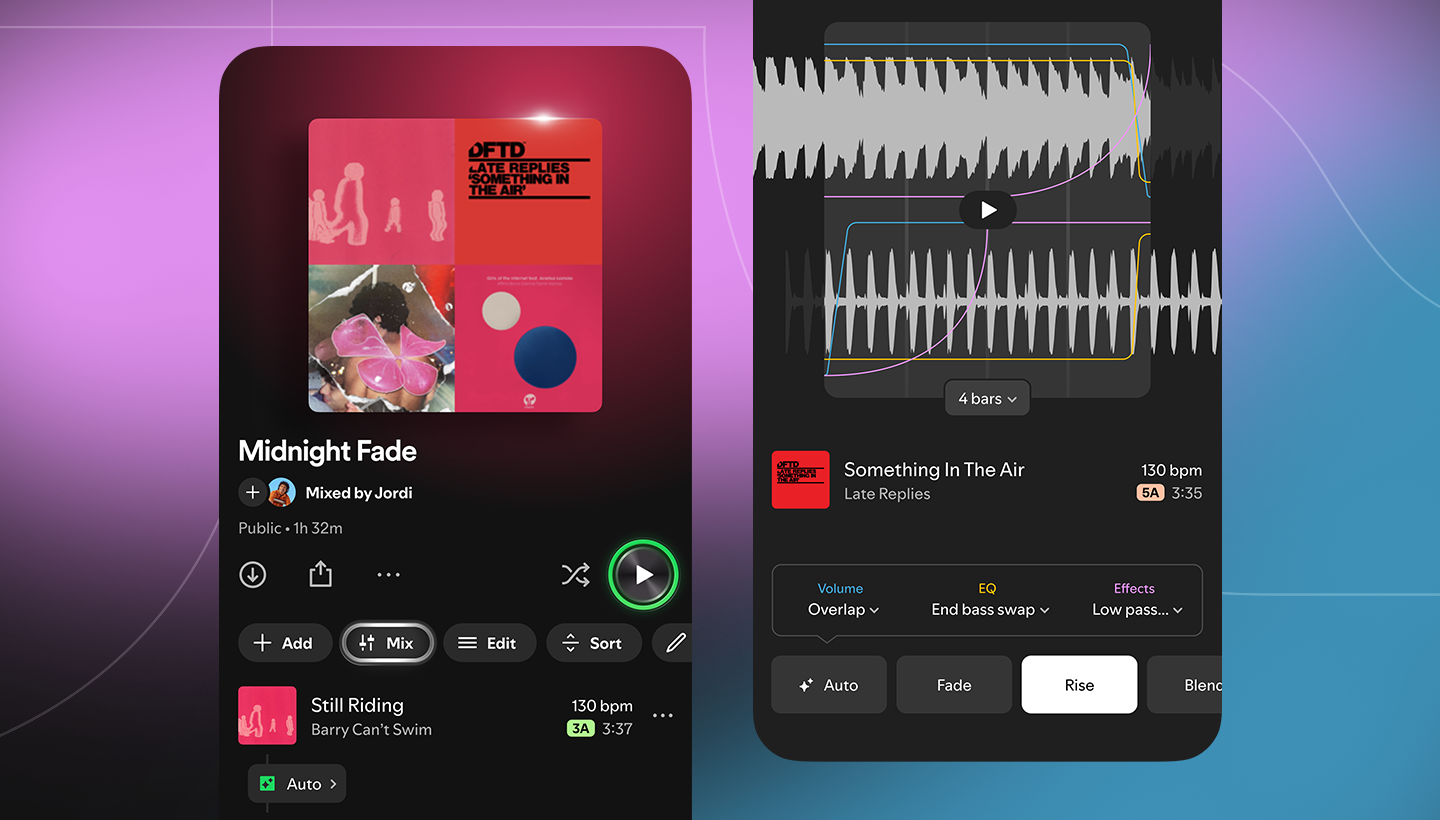
Beyond the basic shuffling of songs, Mix empowers you to fine-tune the listening experience. The new controls and real-time visual feedback on the audio waveforms of your tracks allow you to find the perfect blend point with a level of precision previously only seen in professional DJ software. This isn’t just about avoiding a pause; it’s about building a seamless sonic narrative that captivates your listeners from start to finish.
You can customize how tracks flow together, adjusting everything from volume and EQ to a range of effects with easy-to-use curves. This is more than just a crossfade; it’s an invitation to become a creative partner in your own listening journey.
From listener to Mixer: How it works

Getting started is simple. Open any playlist you’ve already created, or start a new one from scratch. With a single tap, a new “Mix” button appears in the toolbar, instantly transforming your playlist.
For a quick blend, you can select the “Auto” function, which creates an instant, seamless transition between songs. But the real magic happens when you dive into the customization tools. You can choose from preset transition styles like “Fade” or “Rise” to smoothly blend tracks.
For those who want to get more technical, a visual waveform and beat data for each song are displayed, allowing you to find the perfect moment to start a new track and experiment with specific settings for volume, EQ, and effects.
Once you’ve crafted your perfect mix, hit “Save,” and you’re ready to share your creation with friends or collaborate with other Premium users on a shared masterpiece. If you ever want to revert to the standard listening experience, you can simply toggle the Mix feature off at any time.
Spotify offers tips for the aspiring DJ

For users new to the world of audio mixing, Spotify offers a few simple tips to get started and level up your skills:
- Match tempo and keys: For the most natural-sounding transitions, consider placing songs with similar tempos and musical keys next to each other. When you tap “Mix,” Spotify automatically displays a track’s key and BPM (beats per minute), making it easy to rearrange your playlist for a smoother flow.
- Start with the right genre: Mixing works best with music designed for seamless transitions. Genres like house and techno are perfect starting points, as their consistent rhythms and structures are ideal for smooth blending.
- Curate the energy: Think about the mood you want to create. Plan your song order to gradually build energy for a party, or slowly wind down for a relaxing evening, guiding your listeners through a deliberate emotional journey.
- Upgrade your daily grind: This feature is perfect for playlists where you want to avoid awkward pauses, such as during a workout or a long drive. A running playlist, for instance, can now maintain a consistent beat, while a road trip mix can keep the good vibes flowing without interruption.
- Make it visual: Beyond the sound, you can personalize your mix with unique cover art, complete with exclusive stickers and labels only available for mixed playlists, adding a visual layer to your creative expression.

With this new feature, Spotify is empowering its community to not just consume music, but to actively shape their listening experience. By providing these intuitive tools, the platform reaffirms its commitment to helping users express themselves through the music they love.
To access the feature, make sure your Spotify app is updated to the latest version.